
Blog
Insights into how the best teams ship faster without sacrificing the experiences their customers depend on


Testing Mobile Apps the Way Your Users Actually Use Them
Testing Mobile Apps the Way Your Users Actually Use Them
Mobile is where most QA strategies quietly fall apart.
Teams that have solid, automated coverage on the web often have a spreadsheet, a contractor, and a prayer on mobile. The reasons are structural: mobile operating systems, iOS especially, are built around a curated, locked‑down trust model. That model is great for users and terrible for testers. The same walls that keep attackers out keep your automation out.
The industry's usual answer has been to break into the app, inject a library, swizzle the runtime, re‑sign the binary, and fork low‑level agents to wrestle control from the OS. It works, but it comes with a cost that rarely makes it into the sales deck:
You’re no longer testing the app you ship.
Spur takes a different path. Instead of modifying your app, Spur drives it like a person would, an AI agent that looks at the screen, understands it, and acts. Here’s why that matters, and what it unlocks.
Why mobile testing is hard
There are three problems every mobile automation effort runs into:
- The OS won’t cooperate. iOS provides no supported way for an external tool to reach into a running app. Android is a little friendlier, but real‑device fragmentation and flaky tooling erode any head start.
- Selectors are a moving target. Traditional frameworks bind tests to element IDs, XPaths, and accessibility identifiers. The moment a designer renames a button or reflows a screen, your suite turns red, not because the app broke, but because the test did.
- Maintenance eats the ROI. Teams don’t abandon mobile automation because they can’t get it working once. They abandon it because keeping it green costs more than the bugs it catches.
Every approach to mobile testing is really an answer to problem #1, how do you get control? The answer you choose determines whether you also inherit problems #2 and #3.
Two philosophies: instrument the app, or drive the app
Most tools get control by going inside the binary.
The instrumentation approach injects a dynamic library at install time, re‑signs the app with custom certificates, and uses runtime hooks to expose test controls. It’s clever engineering, but it means:
- You test a modified build, not your production binary.
- You inherit an integration burden (signing exceptions, CI/CD injection, managed devices, forked agents to maintain).
- Coverage becomes capability‑by‑capability (camera, mic, barcode, etc. each needs bespoke hooks).
Spur gets control the way a human tester does: by looking at the screen and interacting with it.
There’s no library in your binary, no re‑signing requirement, no swizzling. Spur runs your real app on real iOS simulators and Android emulators, and an AI agent perceives the UI visually and performs actions, taps, types, scrolls, swipes, gestures, based on plain‑English instructions.
The difference in one line:
Instrumentation changes the app so the test can see it. Spur teaches the test to see the app.

How Spur tests mobile
1) You write tests in plain English
No selectors. No coordinates. No code.
“Open the app, continue as guest, search for ‘white jackets’, and confirm results appear.”
That’s a Spur test. You describe the goal the way you’d hand it to a teammate holding the phone, and the agent figures out the interactions. Anyone on the team, QA, PM, support, can author coverage, not just SDETs.
2) An AI agent sees the screen and acts
Under the hood, Spur’s agent uses a vision‑language model to understand what’s actually on screen and decide the next action. Because it reasons about the UI the way a person does, it:
- Adapts to change. Renamed buttons and layout tweaks don’t automatically break the test.
- Handles messy mobile reality. System permission dialogs, tracking prompts, onboarding screens, and interstitials get handled in‑flow instead of derailing the run.
- Self‑heals. No selector graveyard to maintain.
3) It runs unmodified, on real simulators and devices
Your app runs exactly as built. Spur orchestrates the device, launches the app, drives native gestures, and observes results. Native actions, relaunch, foreground, deep links, back navigation, device rotation, shake, keyboard input, toast assertions, are all first‑class, expressed in the same natural‑language flow.
4) Environments and builds are handled
Point a test at a build (iOS or Android) and an environment, and Spur manages install, configuration, credentials, and deep links per environment. Promote the same test across dev, staging, and production without rewriting a thing.
What you can automate first on mobile
If you’re not sure where to start, the highest‑leverage journeys are the ones that break most often, and hurt most when they do:
- Onboarding & auth — email/social sign‑up, login, SSO, “continue as guest,” plus the permission and ATT prompts that derail brittle scripts.
- Search & discovery — queries, filters, sorting, and empty/error states.
- Commerce — add‑to‑cart, checkout, payments, promo codes, order confirmation.
- Account & settings — profile edits, notification toggles, plan changes, logout.
- Deep links & navigation — universal/app links into a specific in‑app screen, plus back‑navigation and tab flows.
- Content & media — feeds, playback, pull‑to‑refresh, infinite scroll, uploads.
- Regression & smoke packs — a core suite that runs on every build, in every environment.
- Cross‑platform parity — the same journeys on iOS and Android from one set of instructions.
Start with your highest‑traffic, highest‑revenue path, describe it in a sentence, and let the AI draft it. You’ll have real coverage running in minutes, not sprints.
A quick mental checklist for “good” mobile tests
- User‑language steps (not implementation details)
- Stable assertions (what the user sees + what the backend did)
- Permission/onboarding resilience (the stuff that flakes first)
- Evidence attached (video + network + logs for every failure)
Watch it happen: live streaming
Automation you can’t see is automation you can’t trust. Spur lets you stream a live, interactive session of the device right in your browser, tap through the app yourself, reproduce an issue, or watch a test drive the flow in real time.
Every run is recorded, with network and console logs captured, so a failure comes with the evidence attached instead of a stack trace and a shrug.
Beyond the screen: network + console observability
A passing tap isn’t proof that everything worked. The most damaging mobile bugs are the ones the screen doesn’t show, a checkout that looks successful but fires a 500 to the payments API, an analytics event that silently stops sending, a token that leaks in a request header, a retry storm quietly draining battery.
Spur runs two dedicated observability agents alongside every mobile test so those failures can’t hide.

The network agent
The network agent captures the requests your app makes, to your own backend and to third‑party SDKs, and turns invisible behavior into something you can assert on:
- Catch silent backend failures (UI says “Order placed,” but
POST /checkoutreturned 500). - Verify integrations and analytics (Segment, attribution SDKs, internal APIs).
- Guard performance and cost (redundant calls, retry storms, oversized payloads, slow endpoints).
- Check privacy and security (see what data leaves the device, and where it goes).
The console log agent
The console log agent captures the app’s own logs, warnings, errors, and stack traces that rarely surface in the UI. When a test fails, you don’t get “element not found”; you get the underlying exception, correlated to the step that triggered it.
Together, these shift mobile QA from “did the screen look right?” to “did the app actually behave correctly end‑to‑end?”
Why this wins

The 2500% Bug Problem: Why AI-Generated Code Needs a New Kind of QA
The 2500% Bug Problem: Why AI-Generated Code Needs a New Kind of QA
Gartner recently made a prediction that stopped me mid-scroll:
By 2028, prompt-to-app approaches adopted by citizen developers will increase software defects by 2500%, triggering a software quality and reliability crisis.
Twenty-five times more bugs. Not typos. Not linting errors a CI pipeline catches in seconds.
Gartner's research points to something more dangerous: a new class of defect where AI output is syntactically correct but architecturally blind. The code runs. It compiles. It even passes a quick smoke test. But it doesn't understand the broader system it's dropping into, and it doesn't know the business rule it just silently broke.
We've seen this failure mode firsthand
In a recent engineering exercise on our own team, an AI coding assistant was asked to build a session-recording tool using a specific DOM-mutation approach, the kind of architectural detail that matters for how the tool performs at scale.
The AI understood the prompt at a surface level and produced code anyway. It just built the wrong thing: a screenshot-polling implementation instead of the DOM-mutation one that was explicitly specified.
It looked like progress. It ran. But it was structurally a different system than the one that had been asked for, and that gap wasn't obvious until someone read the implementation closely.
That's the crux of Gartner's warning. Automation bias, the tendency to trust AI output because it "looks right," is what turns a fast coding tool into a defect factory. And the more code a team ships this way, the more that gap compounds.
What we're hearing from retail and e-commerce teams
We hear a version of this constantly from teams evaluating Spur.
One national retailer we've been talking with has two QA bottlenecks stacked on top of each other:
- A monolithic codebase that requires full regression testing before any release
- A site-experience team that "self-QAs" its own promo and content changes, reviewing its own work, essentially grading its own homework
When we ran a demo against one of their live sites, our agents caught things a human reviewer had missed: a stale holiday shipping banner, and an upsell prompt urging customers to add another item for free shipping, after shipping was already free.
Small. Easy to miss. Exactly the kind of "subtle but severe" flaw Gartner describes. Nobody wrote broken code on purpose. The gap was context, not syntax.
Why traditional QA can't keep up
The traditional answer to catching these issues, more manual QA, more Selenium and Playwright scripts, doesn't scale against AI-generated code's pace or its failure pattern.
One retail brand we're working with told us their existing UI automation has roughly a 20% first-run failure rate, not because the product is broken, but because the tests are brittle: hardcoded to DOM selectors that shift every time the UI changes.
That's the traditional-testing tax, and it was already too slow before AI started multiplying the volume of code hitting production.
The fix: testing at AI speed
This is why Gartner's report calls for governance, not just better tools: architectural checkpoints, human review at the right junctures, and, critically, testing that validates intent and business logic, not just whether a page loads.
That's the layer we built Spur to be. Our agents test the way a human QA analyst would, simulating real customer journeys and checking:
- Functional correctness: does checkout actually work?
- Non-functional details: is the promo text accurate? Does the visual layout hold up? Is the copy still true?
Because tests are built around user intent rather than DOM selectors, they don't shatter every time a frontend team, human or AI, changes a class name.
The bottom line
Gartner's prediction isn't a reason to slow down on AI-assisted development. It's a reason to make sure something is actually watching what AI ships.
The teams that pair AI-speed code generation with AI-speed, context-aware QA are the ones who'll capture the productivity gains without inheriting the defect bill. The teams that don't will spend 2027 and 2028 finding out the hard way.
If you're staring down a growing backlog of AI-generated code and wondering what's actually shipping clean, that's the conversation we'd like to have.

Agentic Mobile Testing 101
Why Spur takes a fundamentally different approach to iOS and Android automation — one that requires no code changes, no instrumentation, and no brittle selectors.
TL;DR: Traditional mobile automation breaks because it depends on hooks, instrumentation, and brittle selectors. Spur runs your real app and drives it visually with an AI agent — so tests survive UI changes and reflect what users actually experience.
Mobile is where most QA strategies quietly fall apart.
Teams that have solid, automated coverage on the web often have a spreadsheet, a contractor, and a prayer on mobile. The reasons are structural: mobile operating systems — iOS especially — are built around a curated, locked-down trust model. That model is great for users and terrible for testers. The same walls that keep attackers out keep your automation out.
The industry's usual answer has been to break into the app — inject a library, swizzle the runtime, re-sign the binary, and fork low-level agents to wrestle control from the OS. It works, but it comes with a cost that rarely makes it into the sales deck:
You're no longer testing the app you ship.
Spur takes a different path. Instead of modifying your app, Spur drives it like a person would — an AI agent that looks at the screen, understands it, and acts. Here's why that matters, and what it unlocks.
What this unlocks: faster test authoring, dramatically lower maintenance, and higher trust — because you're validating the same build your users run.
Why mobile testing is hard
There are three problems every mobile automation effort runs into:
- The OS won't cooperate. iOS provides no supported way for an external tool to reach into a running app. Android is a little friendlier, but real-device fragmentation and flaky tooling erode any head start.
- Selectors are a moving target. Traditional frameworks bind tests to element IDs, XPaths, and accessibility identifiers. The moment a designer renames a button or reflows a screen, your suite turns red — not because the app broke, but because the test did.
- Maintenance eats the ROI. Teams don't abandon mobile automation because they can't get it working once. They abandon it because keeping it green costs more than the bugs it catches.
Every approach to mobile testing is really an answer to problem #1 — how do you get control? The answer you choose determines whether you also inherit problems #2 and #3.
If this sounds familiar: "We tried mobile automation… it worked for a week… then the suite became a full-time job."
Two philosophies: instrument the app, or drive the app
Most tools get control by going inside the binary.
The instrumentation approach injects a dynamic library at install time, re-signs the app with custom certificates, and uses runtime hooks to expose test controls. It's clever engineering — but it means:
- You test a modified build, not your production binary.
- You inherit an integration burden (signing exceptions, CI/CD injection, managed devices, forked agents to maintain).
- Coverage becomes capability-by-capability (camera, mic, barcode, etc. each needs bespoke hooks).
Spur gets control the way a human tester does: by looking at the screen and interacting with it.
There's no library in your binary, no re-signing requirement, no swizzling. Spur runs your real app on real iOS simulators and Android emulators, and an AI agent perceives the UI visually and performs actions — taps, types, scrolls, swipes, gestures — based on plain-English instructions.
The difference in one line:
Instrumentation changes the app so the test can see it. Spur teaches the test to see the app.
How Spur tests mobile
1) You write tests in plain English
No selectors. No coordinates. No code.
"Open the app, continue as guest, search for 'white jackets', and confirm results appear."
That's a Spur test. You describe the goal the way you'd hand it to a teammate holding the phone, and the agent figures out the interactions. Anyone on the team — QA, PM, support — can author coverage, not just SDETs.
Example prompt: "Sign in, skip tracking permission, add any item to cart, and confirm checkout loads."
2) An AI agent sees the screen and acts
Under the hood, Spur's agent uses a vision-language model to understand what's actually on screen and decide the next action. Because it reasons about the UI the way a person does, it:
- Adapts to change. Renamed buttons and layout tweaks don't automatically break the test.
- Handles messy mobile reality. System permission dialogs, tracking prompts, onboarding screens, and interstitials get handled in-flow instead of derailing the run.
- Self-heals. No selector graveyard to maintain.
3) It runs unmodified — on real simulators and devices
Your app runs exactly as built. Spur orchestrates the device, launches the app, drives native gestures, and observes results. Native actions — relaunch, foreground, deep links, back navigation, device rotation, shake, keyboard input, toast assertions — are all first-class, expressed in the same natural-language flow.
4) Environments and builds are handled
Point a test at a build (iOS or Android) and an environment, and Spur manages install, configuration, credentials, and deep links per environment. Promote the same test across dev, staging, and production without rewriting a thing.
What you can automate first on mobile
If you're not sure where to start, the highest-leverage journeys are the ones that break most often — and hurt most when they do:
- Onboarding & auth — email/social sign-up, login, SSO, "continue as guest," plus the permission and ATT prompts that derail brittle scripts.
- Search & discovery — queries, filters, sorting, and empty/error states.
- Commerce — add-to-cart, checkout, payments, promo codes, order confirmation.
- Account & settings — profile edits, notification toggles, plan changes, logout.
- Deep links & navigation — universal/app links into a specific in-app screen, plus back-navigation and tab flows.
- Content & media — feeds, playback, pull-to-refresh, infinite scroll, uploads.
- Regression & smoke packs — a core suite that runs on every build, in every environment.
- Cross-platform parity — the same journeys on iOS and Android from one set of instructions.
Start with your highest-traffic, highest-revenue path, describe it in a sentence, and let the AI draft it. You'll have real coverage running in minutes, not sprints.
A quick mental checklist for "good" mobile tests
- User-language steps (not implementation details)
- Stable assertions (what the user sees + what the backend did)
- Permission/onboarding resilience (the stuff that flakes first)
- Evidence attached (video + network + logs for every failure)
Watch it happen: live streaming
Automation you can't see is automation you can't trust. Spur lets you stream a live, interactive session of the device right in your browser — tap through the app yourself, reproduce an issue, or watch a test drive the flow in real time.
Every run is recorded, with network and console logs captured, so a failure comes with the evidence attached instead of a stack trace and a shrug.
Beyond the screen: network + console observability
A passing tap isn't proof that everything worked. The most damaging mobile bugs are the ones the screen doesn't show — a checkout that looks successful but fires a 500 to the payments API, an analytics event that silently stops sending, a token that leaks in a request header, a retry storm quietly draining battery.
Spur runs two dedicated observability agents alongside every mobile test so those failures can't hide.
The network agent
The network agent captures the requests your app makes — to your own backend and to third-party SDKs — and turns invisible behavior into something you can assert on:
- Catch silent backend failures (UI says "Order placed," but POST /checkout returned 500).
- Verify integrations and analytics (Segment, attribution SDKs, internal APIs).
- Guard performance and cost (redundant calls, retry storms, oversized payloads, slow endpoints).
- Check privacy and security (see what data leaves the device, and where it goes).
The console log agent
The console log agent captures the app's own logs — warnings, errors, and stack traces that rarely surface in the UI. When a test fails, you don't get "element not found"; you get the underlying exception, correlated to the step that triggered it.
Together, these shift mobile QA from "did the screen look right?" to "did the app actually behave correctly end-to-end?"
Why this wins
- App under test — Instrumentation-based tools: a re-signed, dylib-injected build. Spur: your real app, unmodified.
- Authoring — Instrumentation-based tools: code + selectors. Spur: plain English, no code.
- Resilience to UI change — Instrumentation-based tools: break on selector changes. Spur: AI adapts — self-healing.
- Setup — Instrumentation-based tools: signing exceptions, CI/CD injection. Spur: point at a build + environment.
- Cross-platform — Instrumentation-based tools: per-platform tooling. Spur: one model for web, iOS, and Android.
- Maintenance — Instrumentation-based tools: grows with the suite. Spur: minimal selector upkeep.
Get started
If mobile has been the gap in your automated coverage — the platform where you're still paying for manual QA or skipping it entirely — Spur closes it without asking you to modify your app or hire a team to babysit selectors.
Write your first mobile test in plain English today. Start with one critical flow (signup, search, or checkout), describe it in a sentence, and let Spur draft the full test.
FAQ
Do I have to modify or re-sign my app?
No. Spur runs your real app on managed simulators/devices and drives it externally with an AI agent.
Do I need to write code or maintain selectors?
No. Tests are natural-language steps. The agent interprets the screen visually, so there are no element IDs or XPaths to keep in sync with your UI.
What happens when the UI changes?
The agent recognizes intent ("the primary button," "the search field"), so cosmetic and layout changes that shatter selector-based suites generally don't break Spur tests.
iOS and Android both?
Yes — and the same authoring model covers web too. One way to write tests across all three.
Can I see what the tests are doing?
Yes. Stream a live, interactive session in your browser, and every run is recorded with network and console logs.
Can I assert on network requests and console logs?
Yes — in the same natural language you use for on-screen checks (e.g., "expect a successful POST /checkout", "fail if there are any console errors").

Why E-Commerce Teams Are Switching from Mabl to Spur
Why E-Commerce Teams Are Switching from Mabl to Spur
A look at what we're hearing in evaluations, POCs, and sales calls, and why brands running head-to-head trials keep landing on Spur.
If you run QA for an e-commerce brand, chances are you've evaluated Mabl. We see it constantly: in nearly every competitive POC we run, Mabl is the incumbent or the other finalist. It's a capable, well-established low-code testing platform.
And yet, when brands run both tools side by side on their actual storefronts, they keep choosing Spur. In recent months, two well-known retail brands, a premium apparel company and a national furniture retailer, ran structured, competitive POCs of Spur against Mabl. Both explicitly picked Spur.
This post breaks down why. Not with vague AI marketing claims, but with the specific patterns we hear from merchandising, QA, and engineering teams every week.
The problem isn't your QA team. It's the shape of e-commerce testing.
Here's a pattern we hear on almost every discovery call:
A merchandising team preps a product drop with 300+ new items going live at once. Two or three people spend hours working through a QA cheat sheet: does every PDP load, is the pricing right, does add-to-cart work, is the copy correct, are reviews attached. Hours of manual checking per launch.
And bugs still ship. Broken add-to-cart buttons on launch day. Prices that don't match the promo. Copy mismatches. Because when you're spot-checking a sample of hundreds (or thousands, in a markdown event), things slip through. Every one of those misses costs revenue at the exact moment traffic peaks.
That's the job to be done. So the real question in any Mabl-vs-Spur evaluation is: which tool actually covers that?
Where teams tell us Mabl falls short
To be fair to Mabl: it has invested heavily in AI, including auto-healing and agentic test creation. But in evaluations, three themes come up repeatedly, from prospects and echoed across public review sites:
1. Test maintenance never really goes away. Low-code recorders still produce tests that are coupled to your site's structure. E-commerce sites change constantly: themes, apps, promos, A/B tests. The line we hear over and over: "our site is changing all the time, and our tests keep breaking." Auto-healing helps with selector drift, but when your homepage is rebuilt for a campaign, someone still spends their week fixing tests instead of shipping.
2. Credit-based pricing punishes exactly the testing e-commerce needs. Mabl doesn't publish pricing; third-party sources place entry plans around $499/month for 500 cloud-run credits, with enterprise deals reported north of $40k/year. The catch: a real regression suite burns credits fast. Run a few hundred cloud executions a day (normal for a brand shipping daily) and an entry plan's monthly allowance can evaporate in under a day. Teams end up rationing test runs, which defeats the purpose.
3. It tests scripts, not shopping. Reviewers also flag slow cloud execution and gaps outside web testing. But the deeper issue we hear is philosophical: scripted and recorded tests validate the paths someone thought to record. As one engineering leader put it on a recent call, "manual testing is only testing happy paths," and scripted automation mostly inherits that limitation. Nobody scripts "check all 300 products in tomorrow's drop behave like a real shopper expects."
What Spur does differently
Spur is built around AI agents that test your store the way a customer shops it.
Agents, not scripts. You describe what should work ("a shopper can find a new-arrival product, select a size, add to cart, and check out with a discount code") and Spur's agents execute it like a real user, adapting as your site changes. When you redesign your PDP, you don't rewrite tests; the agent just keeps shopping.
Built for merchandising events, not just releases. Product drops, markdowns, and promo launches, the moments where e-commerce actually breaks, are first-class citizens. Instead of spot-checking 10 SKUs out of 300, agents validate the full drop: pricing, copy, imagery, add-to-cart, reviews. One activewear brand's merchandising team went from hours of manual cheat-sheet QA per launch to owning the results without owning the busywork.
QA owns the automation; merchandising gets their time back. The ownership model that wins internally: QA runs Spur, merchandising stops being an unpaid QA department. That's the model brands keep converging on in our POCs, because merchandising teams told us plainly they value time savings over another tool to learn.
Full-suite runs without credit math. Testing your whole catalog before a launch shouldn't be a budgeting exercise. Spur's pricing is built so you run what you need, when you need it, especially on the days it matters most.
The proof: head-to-head POCs
We don't ask anyone to take this on faith. Our standard motion is a competitive POC: same store, same flows, same success criteria, Spur and Mabl side by side.
In the two most recent competitive bake-offs (the apparel brand and the furniture retailer mentioned above), both teams chose Spur. Not because Mabl failed to run tests, but because Spur caught real end-user-facing issues with less setup and near-zero maintenance, and it kept working as their sites changed.
One practical tip if you're running your own evaluation: judge the outcomes, not the agent's keystrokes. Teams sometimes spend the POC "QA-ing the agent," scrutinizing how it navigates, instead of measuring what matters: bugs caught, hours saved, launches protected. Set success criteria upfront and hold both tools to them.
Is Mabl ever the right choice?
Sure. If you're a general SaaS product with a stable UI, an established QA engineering team, and predictable regression needs, Mabl's platform is mature and well-supported. This isn't a hit piece.
But if you're an e-commerce brand, where the site changes weekly, launches are revenue events, and the people who feel QA pain sit in merchandising as much as engineering, you're not the customer scripted tools were designed for. You need testing that behaves like your customers do.
Run the bake-off
If your Mabl contract is coming up for renewal, that's the perfect time to run a two-week competitive POC. Bring your next product drop. We'll bring the agents. Judge us on bugs caught and hours saved.
Pricing and feature claims about Mabl are based on publicly available third-party sources as of July 2026, including G2, Software Advice, and independent pricing analyses. Mabl does not publish official pricing.

How MCP and AI are Changing Enterprise QA in 2026
Throughout the history of automated QA testing, there have been two big inflection points that drove great leaps in QA productivity. Today, we introduce the third.
The first was the introduction of ergonomic testing script languages, such as Playwright. QAs were able to automate tens of flows, test stable pages with scripts that would run through selectors. Teams started to pick up processes around this – Test driven development, requiring tests with every feature.
The second unlock was the advent of agents and LLMs. With each new SOTA model, the need for brittle selectors and script syntax became less relevant. With products such as Spur, automated QA has moved out of the realm of niche technical knowledge and into pure systems-thinking. QA stopped being limited by a mastery of automation languages.
The QA that uses Spur now spends their time thinking about what needs to be tested, and manages a swarm of agents to surface new insights.
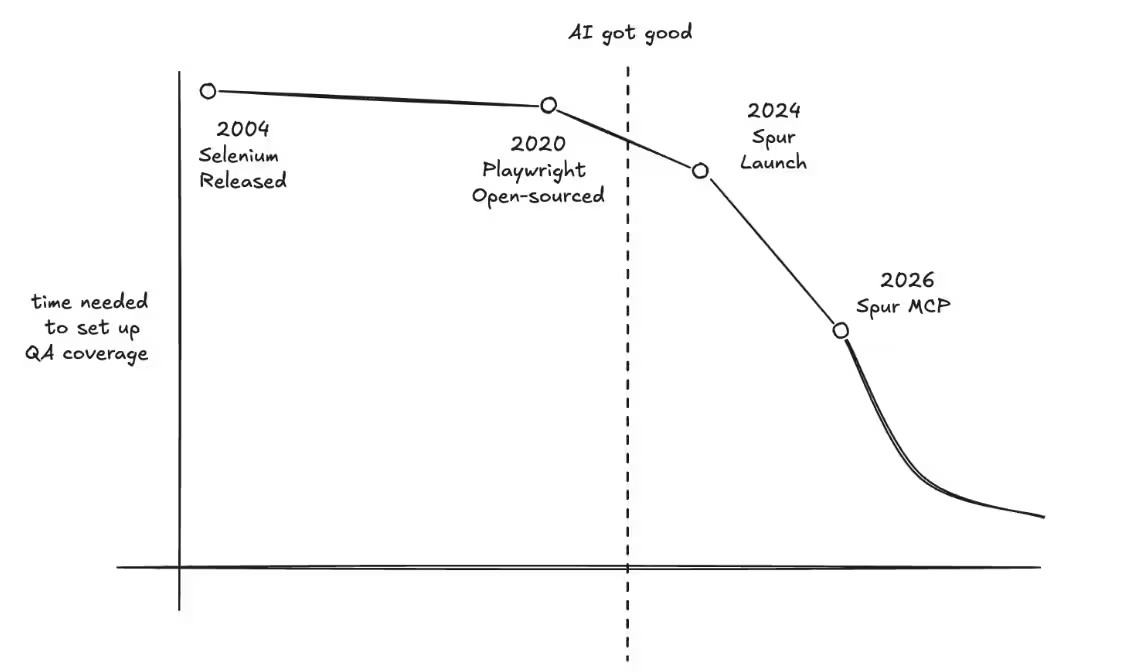
Today, we are proud to launch the third jump in QA productivity with the release of our MCP. We’ve greatly expanded Spur’s agentic capabilities. AI can now handle the entire testing loop, and now the only thing a QA needs is intent, while Spur handles all the busy work.
What is an MCP?
An MCP Server is a protocol initially described and published by Anthropic, and has since become the primary way AI can use third-party features. The Spur MCP allows your AI chats or agents (ChatGPT conversations, Claude agents, Copilot chats, …) to use Spur itself – writing tests, running them, even analyzing them. We’ve built parity to almost every feature on our application, so your AI agents have the full capability to operate your testing.
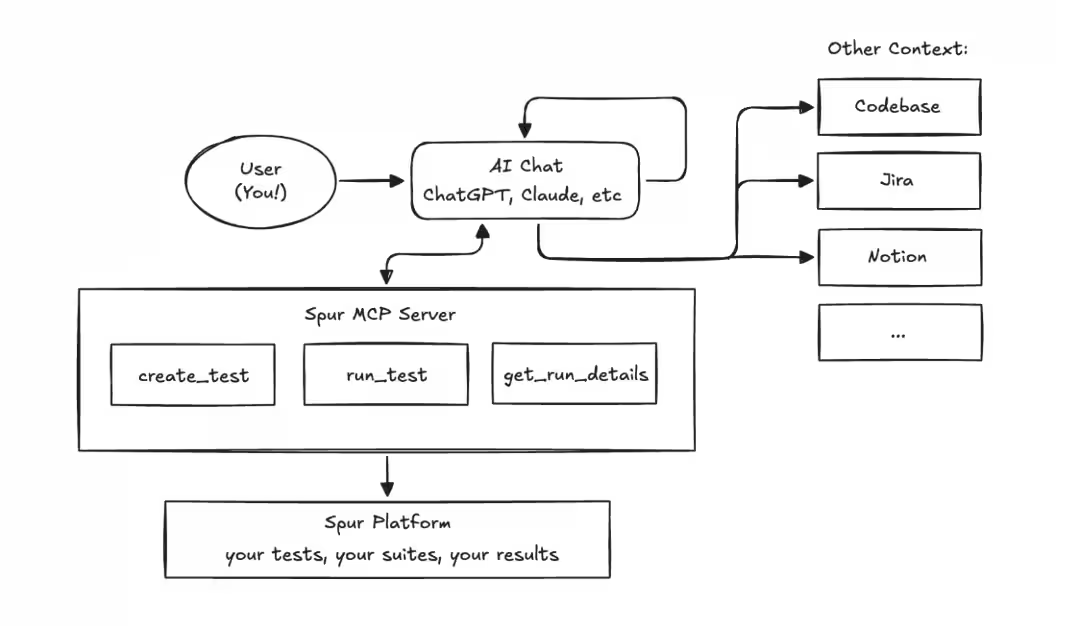
A note about AI hallucinations: The Spur MCP server gets used by your AI chats, so improper outputs from the model are not under our control. However, we have introduced several safeguards, as well as getting approval for any potentially destructive action.
We’ve rolled this feature out to all customers for a few weeks now, and already we are seeing extremely powerful usages of these tools.
Use Case 1: Writing Tests
Early in our development of Spur, the idea of generating the tests themselves was an enticing one. But the problem was that AI generated tests were often aimless and would assume large jumps in the user flow. Since then, two big changes have occurred. The first is the jump in model capabilities. The difference in agents and models from even late 2025 to now has been the difference between a fantastic, even fun generation experience and a frustrating one. The second was developing the MCP to bring novel context to the agent. Some users use the MCP in their codebase, giving literal complete context to the test writing, while others look internally at their own tests, learning from past test runs to map out their product. Improving intelligence and context led to shockingly good tests.
A big focus for us at Spur was how we could develop this feature while keeping Enterprise level diligence. QA has long since trailed behind development in adopting AI features, as hallucinations are unacceptable in the last line of defense. Early adopters of the Spur MCP have shown us ways they use the MCP to bulletproof their QA.
We’ve given agents the ability to operate Spur, to create tests and run them. A beta user of this feature showed us his Skills – files that contain instructions for the agent. His create-tests Skill instructs the agent to first review existing tests, pulling the writing style before creating these tests. Agents controlling Spur made it possible to then continuously run and review the results, polishing them until they were production ready. This continuous polish allowed him to create Production-ready tests from one prompt.
We tell our customers to treat the Spur agent like a colleague new to your product. Now, users can treat the Spur agent like a senior colleague – one who’s learned the product inside and out.
Use Case 2: Complete Testing Loop in CICD
Our customers continue to inspire us. An engineering firm we work with showed us the workflow they’ve set up with MCP, which we very quickly folded into our own dogfooding process. A PR opens, and a testing agent is instantly spun up. The agent looks over available Spur tests, finds the ones that test the feature, writes new tests if those don’t exist, and fully tests the feature. For teams that are always finding themselves ahead of their testing (like us!) this changes everything.
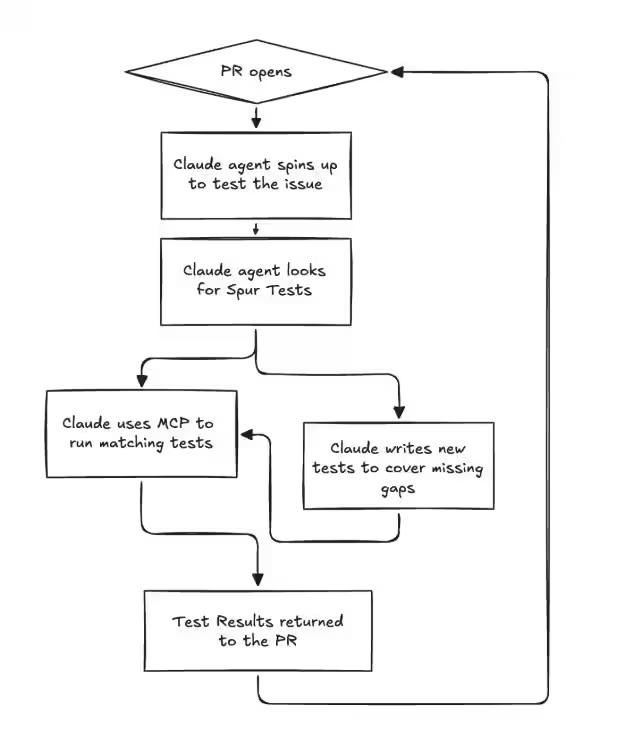
Test coverage automatically grows with your application.
“The future will increasingly be built for agents” is a common statement nowadays. By making all possible operations on Spur accessible for agents, workflows such as the ability to choose, create, and run only relevant tests on feature push go from the realm of wishful thinking to production ready. At Spur, we are making QA built for agents.
What does a QA look like now?
Software developers have long felt the productivity benefits of AI, while often leaving QA behind as an afterthought. The Spur MCP has provided the 10x productivity jump so desperately needed to the QA team. Creating resilient, useful and valuable tests has never been easier, to the point where 100% test coverage can become the starting point rather than the distant goal. An important milestone when code is pushed faster and faster.
And yet, quality-thinking has never been more important. Spur can create, perform, and analyze tests, but knowledge and expertise is needed to identify where platforms are likely to break, and to direct Spur. The QA of today, using Spur, is no longer running through flows manually, nor writing brittle Playwright scripts, nor writing Spur tests by hand. They are directing and managing agents, to cover more application surface than entire teams could.
We are excited to release these use cases as Agent Skills for your team to use today. Book a demo here!
We are hiring across engineering and sales to build the 10x productivity boost to QA so necessary in the age of 10x developers. Come join us!

The Hidden QA Tax on Data Science Teams
Nobody budgets for tracking QA
Ask a data science team what slows them down and you'll hear the usual suspects: messy data, unclear requirements, stakeholder whiplash. Fair enough. But there's another time sink that rarely gets mentioned because it doesn't feel like "real work" — manually verifying that analytics events actually fire correctly.
Every deploy cycle, someone on the team opens Chrome DevTools, clicks through a user flow, eyeballs the Network tab, and checks whether the right events showed up with the right payloads. It's tedious. It's error-prone. And it eats way more hours than anyone wants to admit.
The problem with silent failures
Here's what makes tracking QA particularly painful: when it breaks, nothing visibly breaks. The site works fine. Users don't complain. But behind the scenes, events stop firing, required fields go missing, data types shift from strings to numbers, and third-party pixels get quietly dropped.
You don't find out until someone pulls a report two weeks later and the numbers look wrong. By then, the data gap is permanent. You can't backfill events that never fired.
We talk to data teams regularly and the pattern is consistent:
- About half of tracking issues are events that simply stopped firing after a code change
- Another 40% are missing or malformed fields in the payload
- The remaining 10% are subtler — wrong data types, casing changes, format drift
None of these throw errors. None of them show up in monitoring dashboards. They just silently corrupt your data.
What manual QA actually costs
Let's be honest about the math. A site with 30+ tracked events across multiple regions, browsers, and environments creates thousands of combinations to check. No one checks all of them. Teams spot-check the important flows and hope for the best.
That looks something like this every release cycle:
- Open DevTools on the target page
- Click through the flow (product view, add to cart, checkout)
- Search the Network tab for the right request
- Manually inspect each payload field
- Screenshot as evidence
- Cross-reference with whatever analytics platform you're using
- Repeat for every region and browser combination you have time for
- File a ticket if something looks off
Realistically, this takes 2-4 hours per validation cycle. And because it's manual, coverage sits around 30% at best. The other 70% is trust and luck.
Here's the part that stings: every hour spent in DevTools is an hour not spent on actual analysis. Data scientists didn't sign up to be QA engineers for tracking implementations. But someone has to do it, and it usually falls on the people who understand the data best.
Why this gets worse over time
Tracking implementations aren't static. New events get added. Existing events get modified. Third-party scripts update themselves without warning. Marketing asks for new UTM parameters. The consent management platform changes behavior.
Each change is a new surface area for breakage. And because the QA is manual, the gap between what's tested and what's deployed keeps growing. Teams that were keeping up six months ago are now drowning, and they can't always explain why — it just takes longer to validate everything.
Multi-region and multi-brand setups make this exponentially worse. An event that works fine on the US site might be broken on the UK site because of a locale-specific code path nobody thought to check.
What automated validation looks like
The fix isn't hiring more people to stare at DevTools. It's automating the validation itself.
Spur replaces the manual DevTools workflow with an AI agent that runs a real browser, performs user flows exactly like a human would, captures all network traffic, and validates event payloads against your expectations. You describe what to check in plain language — "confirm the purchase event contains order_id, revenue as a number, and items as an array" — and the agent handles finding the request, parsing the payload, and reporting pass/fail with the actual data it found.
The same validation that takes a person 2-4 hours runs in under 10 minutes. Every field gets checked, every time. Across Chrome, Safari, and mobile. Across regions. In parallel.
You schedule it to run after every deploy, or daily, or both. When something breaks, you know within minutes — not two weeks later when a report looks wrong.
Where to start
If you're on a data team dealing with this, start with the one event that would cause the most damage if it broke. For most teams that's the purchase or order confirmation event — it's tied directly to revenue attribution and commission payouts.
Document what "correct" looks like: the event name, every required field, expected data types, format rules. Then automate that single check and schedule it to run on every deploy.
Once that's solid, expand to your next highest-priority event. Within a few weeks you'll have automated coverage over the flows that matter most, and your team can get back to the work they were actually hired to do.
The real cost isn't the hours
The hours matter, yes. But the bigger cost is what happens when broken tracking goes undetected. Bad data leads to bad dashboards, which leads to bad decisions. Attribution models trained on incomplete data misallocate budget. A/B tests with corrupted event data produce meaningless results.
Most data teams have experienced this at least once — the sinking feeling of realizing that a key metric has been wrong for weeks because an event silently stopped firing. That's the real tax. And it's entirely preventable.
Ready to transform your testing?
Schedule a demo to see how Spur can handle all your QA, save development time and prevent costly bugs.